A Visual Introduction to Chef
By kate on September 9th, 2011
At Urbanspoon, we’ve recently started using Chef to manage our production servers. Now that I’m familiar with it, I love its ease of use and flexibility, not to mention the time savings.
When I was first learning Chef, though, I found the learning curve pretty steep because of all the terminology. It was hard to understand how all the components related to each other. I wasn’t able to find anything online that would have helped give me the overview I needed, so I created one myself.
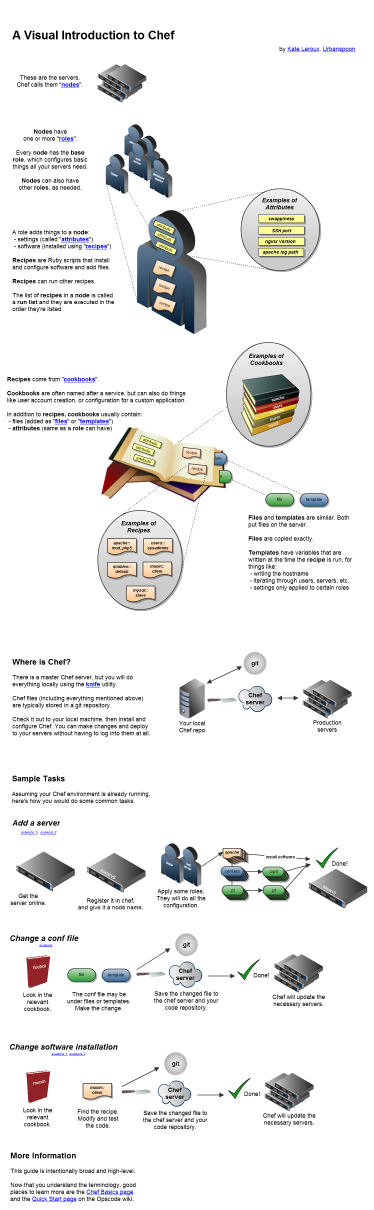
Click image for full diagram.
Filed under: technology
| « Offbeat Divorce Part 2: Advice for separating couples | Urbanspoon (and I) oppose SOPA » |
6 Responses to “A Visual Introduction to Chef”
Leave a Comment


Contact
Recently Read



September 10th, 2011 at 9:35 am
This is awesome Kate! I’m working with Chef, and my work has been somewhat of a black box to many at my organization. A coworker found your diagram and passed it around, and I KNOW everyone will have a better understanding of what I’m working on once they see it 🙂
Any thoughts on how data bags might be best described? Seems it’s the only high-level thing your missed (although they’re nebulous, so they may be tough to pin down). They’re essentially where you want to keep all the variable info that you want others to be able to easily manipulate. Conversely, cookbooks/recipes/roles should be pretty static once your infra is stably up and running 🙂
September 11th, 2011 at 4:41 pm
Thanks for your comment, Patrick! I thought about including data bags but haven’t thought of a good way to represent the concept. I’ll probably add them at some point soon.
September 13th, 2011 at 10:01 am
[…] http://www.mynameiskate.com/blog/2011/09/09/a-visual-introduction-to-chef/ Leave a Comment TrackBack URI […]
February 2nd, 2013 at 3:28 am
absolutely brilliant diagram – thanks. FYI the links to the opscode wiki are no longer working.
February 2nd, 2013 at 12:21 pm
Thanks, Dara! I fixed the links.
September 2nd, 2013 at 3:41 am
Thank you so much for this! I’m just starting work with Chef and yes, it was confusing. 🙂 Great work!